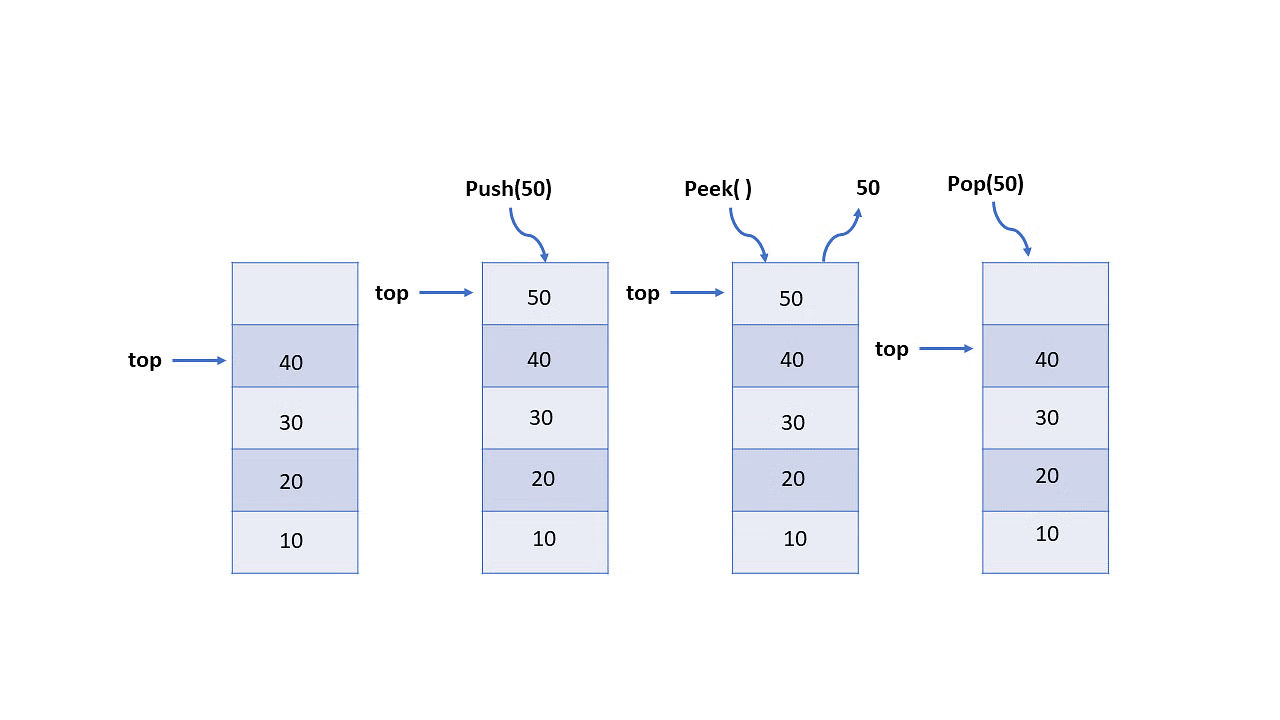
AI Translated from Chinese
If algorithms are the soul of a program, then data structures are like the body. When learning data structures, you can’t miss the basic and classic — stack So, what is a stack?
What is a Stack
Stack is the singer/lyricist/occasionally composer/arranger of the Touhou Project doujin music circle “暁records”, with a unique voice. Although some people don’t like it, it’s never ignored, leaving an unforgettable impression once heard……>

Ahem… getting serious:
In computer science, a stack is an abstract data type that serves as a collection of elements, with two main operations:
- Push, which adds an element to the collection, and
- Pop, which removes the most recently added element that was not yet removed. ——from WIKIPEDIA
In short, a stack (also known as heap stack or stack) is a linear storage structure that follows the “Last In First Out” (LIFO) rule, with two operations: PUSH and POP
- PUSH: Push elements onto the stack top
- POP: Pop elements from the stack top
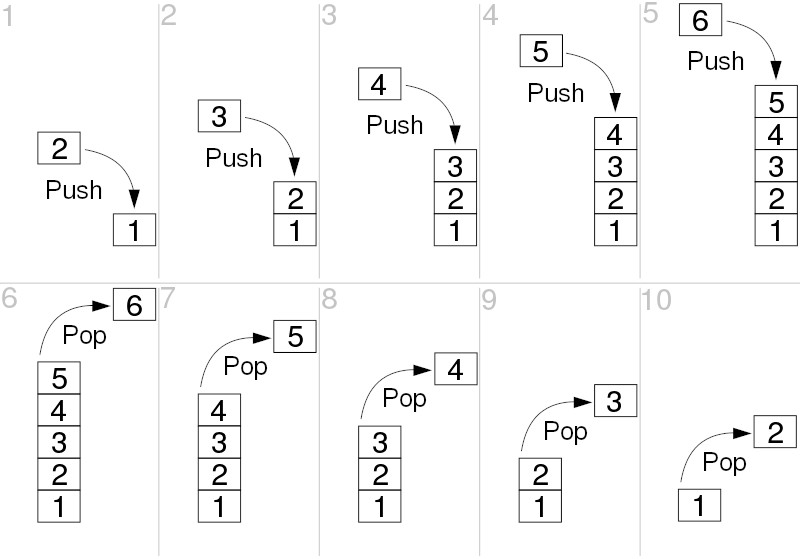
From this, we know that elements can only enter and exit from the top, not from the bottom. Think of a candy box with a single opening at one end, closed at the bottom — to access candies, you can only do so from the opening end. Each operation only involves the top element.
Code Implementation
Example Problem
Use an example problem to illustrate the use of stacks: Rails (UVa 514) The problem has been slightly modified
Summary There is a famous railway station in PopPush City. Country there is incredibly hilly. The station was built in last century. Unfortunately, funds were extremely limited that time. It was possible to establish only a surface track. Moreover, it turned out that the station could be only a dead-end one (see picture) and due to lack of available space it could have only one track.
Explanation The problem requires reordering items on a stack, specifically to determine if the reordering can be done in a single pass.
Input Sample
5
1 2 3 4 5
5
5 4 1 2 3
6
6 5 4 3 2 1
Output Sample
Yes
No
Yes
C++
C++’s STL provides special data structures including stacks, which can be called conveniently. Referenced from Liu Rujia’s code
rails.cpp
#include <cstdio>
#include <stack>
using namespace std;
const int MAXN = 1000 + 10;

int n, target[MAXN];

int main()
{
    while (scanf("%d", &n) == 1)
    {
        stack<int> s;
        int A = 1, B = 1;
        for (int i = 1; i <= n; i++)
            scanf("%d", &target[i]);
        int ok = 1;
        while (B <= n)
        {
            if (A == target[B]) { A++; B++; }
            else if (!s.empty() && s.top() == target[B]) { s.pop(); B++; }
            else if (A <= n) s.push(A++);
            else { ok = 0; break; }
        }
        printf("%s\n", ok ? "Yes" : "No");
    }
    return 0;
}
Python
Python Re-translation
Python’s built-in data structures are quite powerful and can easily simulate a stack
rails.py
while 1:
    n = input()
    if n == "":
        break
    n = int(n)
    s = []
    target = [0] + list(map(int, input().split()))
    A, B, ok = 1, 1, 1
    while B <= n:
        if A == target[B]:
            A += 1
            B += 1
        elif len(s) != 0 and s[-1] == target[B]:
            s.pop(-1)
            B += 1
        elif A <= n:
            A += 1
            s.append(A)
        else:
            ok = 0
            break
    if ok == 1:
        print("Yes")
    else:
        print("No")
EX: Python Class Implementation of Stack
Using the convenient list built-in data structure, we can implement a stack using a Python class
stack.py
class Stack(object):
    __slots__ = ('__items')  # Limit Stack class members to only __items
    # Initialize stack as empty list
    def __init__(self):
        self.__items = []  # Private property

    # Check if stack is empty, return boolean
    def empty(self):
        return self.__items == []

    # Return top element
    def top(self):
        return self.__items[-1]

    # Return stack size
    def size(self):
        return len(self.__items)

    # Push new element onto stack (programmers like to call this push, push in, push onto...)
    def push(self, item):
        self.__items.append(item)

    # Pop top element from stack (programmers like to call this pop, pop out...)
    def pop(self):
        return self.__items.pop(-1)


if __name__ == '__main__':
    # Initialize a stack object
    my_stack = Stack()

    # Push 'candy_01' onto stack
    my_stack.push('candy_01')

    # Push 'candy_02' onto stack
    my_stack.push('candy_02')

    # Check stack size
    print(my_stack.size())

    # Print top element
    print(my_stack.top())

    # Pop and print top element
    print(my_stack.pop())

    # Check top element again
    print(my_stack.top())

    # What's the stack size now?
    print(my_stack.size())

    # Pop another element
    print(my_stack.pop())

    # Check stack size
    print(my_stack.size())

    # Is stack empty?
    print(my_stack.empty())

    # Wow~ So delicious~
    print('Yummy~')
